
Dining, at the table or in the room
Let guests explore the menu at their own pace and keep their order tied to the right room or table.
- Dining and room-service orders
- Restaurant table reservations
Hotel QR software
A menu at the table. Fresh towels for the room. A spa booking for tomorrow.
BluePMS gives guests a way to reach your hotel’s services from their own browser. Your team chooses what appears, handles requests and keeps control of orders, access and checkout.
The guest experience
BluePMS brings 20 service options into the Guest Services Hub. Enable the ones your hotel offers, then set up the availability, prices and teams behind them.
Let guests explore the menu at their own pace and keep their order tied to the right room or table.
Give guests a way to explore dates, availability and prices without starting a separate conversation.
A request for fresh towels or help with luggage reaches the hotel with the guest’s message and room context.
Bring the services your hotel offers into the guest’s view, with booking options set up by the relevant team.
Give verified guests access to their account and a way to prepare for departure while your team retains checkout control.
Keep hotel information close at hand and make it clear where guests can share feedback or raise a private concern.
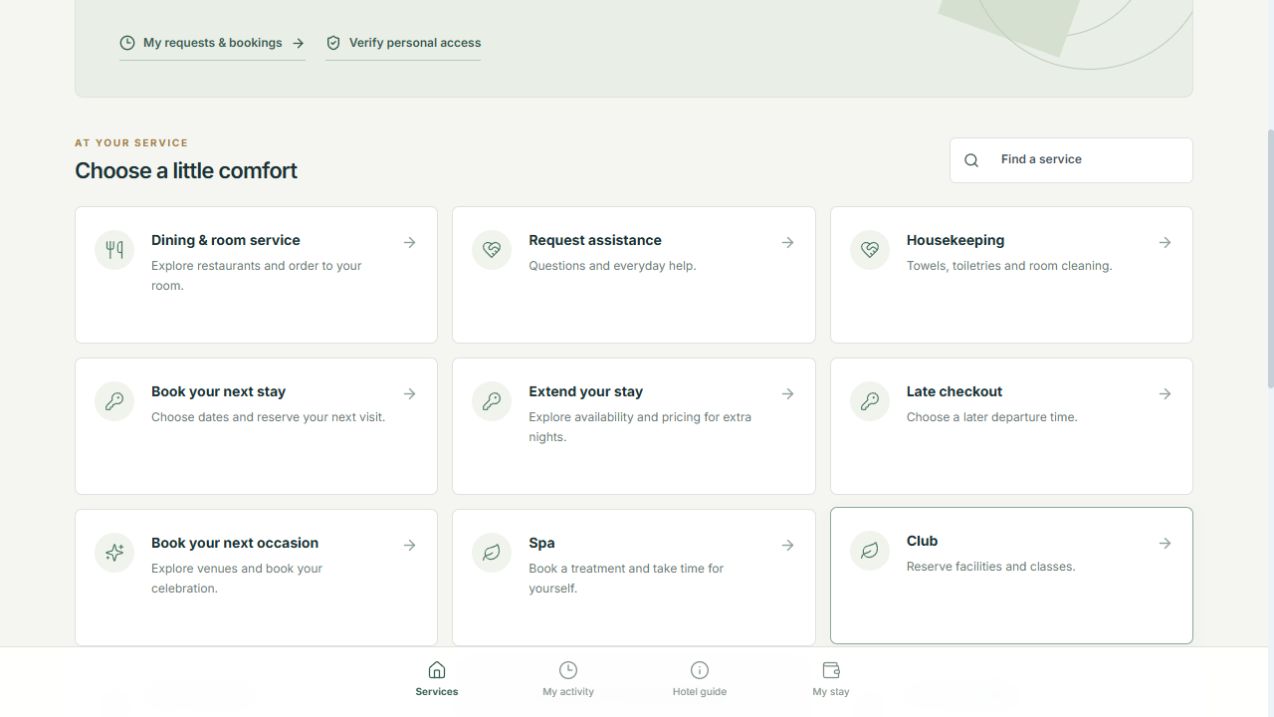
Guests can search for a service and return to My activity for their requests and bookings. Hotel information and account access have their own places in the navigation.
Services that need personal access ask the guest to verify before continuing. Booking availability and confirmation follow the rules of the relevant service.
QR menus and room-service ordering
Table codes open the assigned restaurant’s dining experience. Room codes can offer a choice of the restaurants configured for room ordering.
Search dishes and drinks, explore categories and review item descriptions, images and prices where provided.
Choose quantities and available modifiers, add instructions and check the displayed taxes, charges and total before sending.
When staff acceptance is enabled, the team accepts or rejects the order before a Kitchen Order Ticket is created.
Guests can follow their order history and choose Pay at Outlet or eligible Charge to Room when ordering. Submitting an order does not settle it. Online bill payments are a separate configured service.
Explore Point of SalesBehind each request
A request should arrive with enough context to act on it. BluePMS keeps the guest’s message, room context and subsequent replies together.
The guest chooses a service and describes the request. Staff receive the message and room details in the guest-services workspace, ready for assignment and follow-up.
Assign the request, reply to the guest and update its progress. Guests can return to their activity to read replies and check the recorded status.
Retain the request and resolution history. Private messages to the General Manager are handled through separate permissions for the manager and authorised delegates.
A room password opens the configured room experience. A personal code issued for an active registered guest protects requests, bookings, private activity and account details.
Control for the property
Start with the services your teams are ready to support. QR Configuration brings guest visibility, room cards, restaurant-table cards and access policies into one workspace.
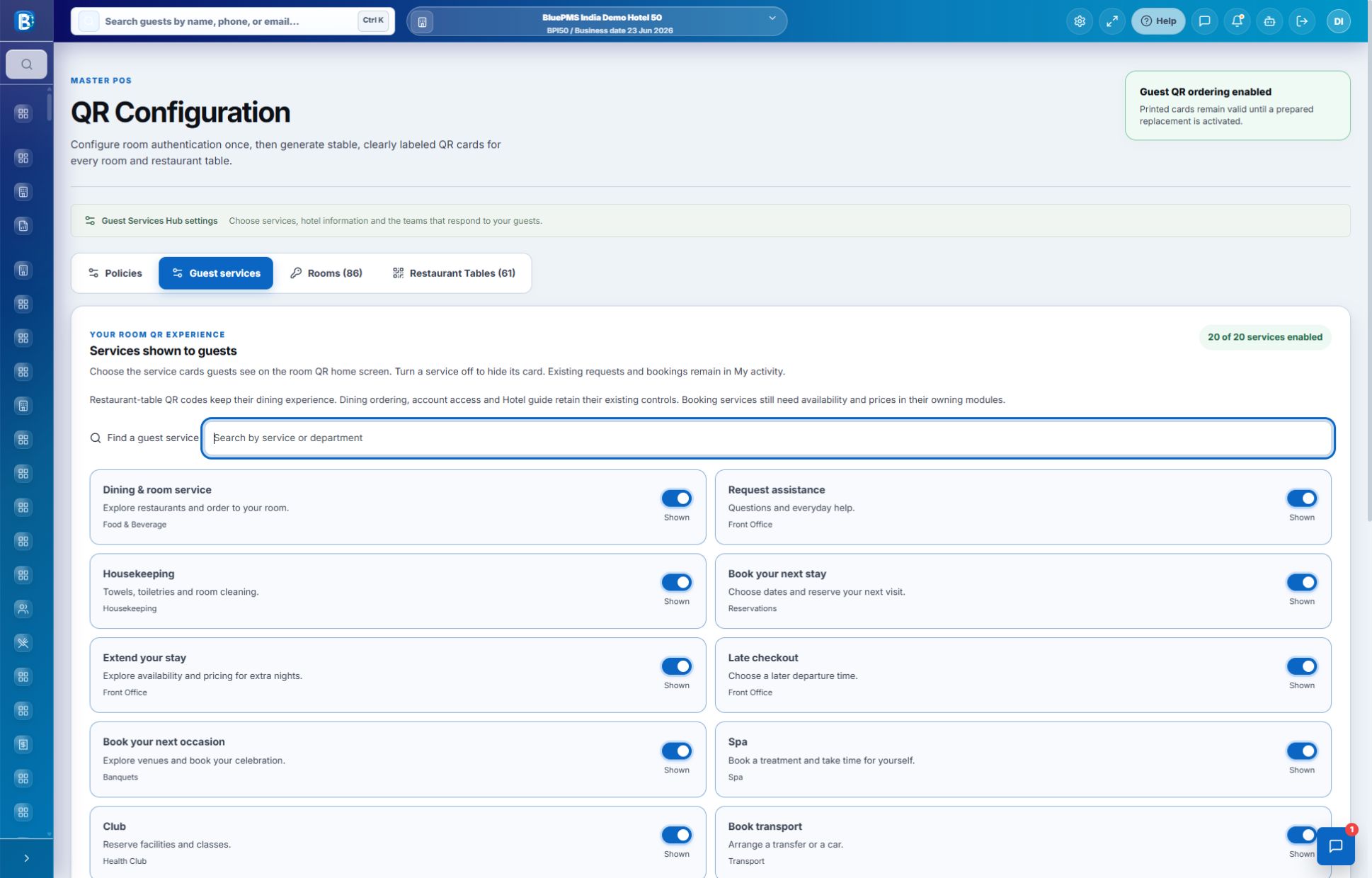
Switch individual services on or off. Hiding a card leaves existing requests and bookings in My activity. Offers, prices and availability are configured in the relevant service modules.
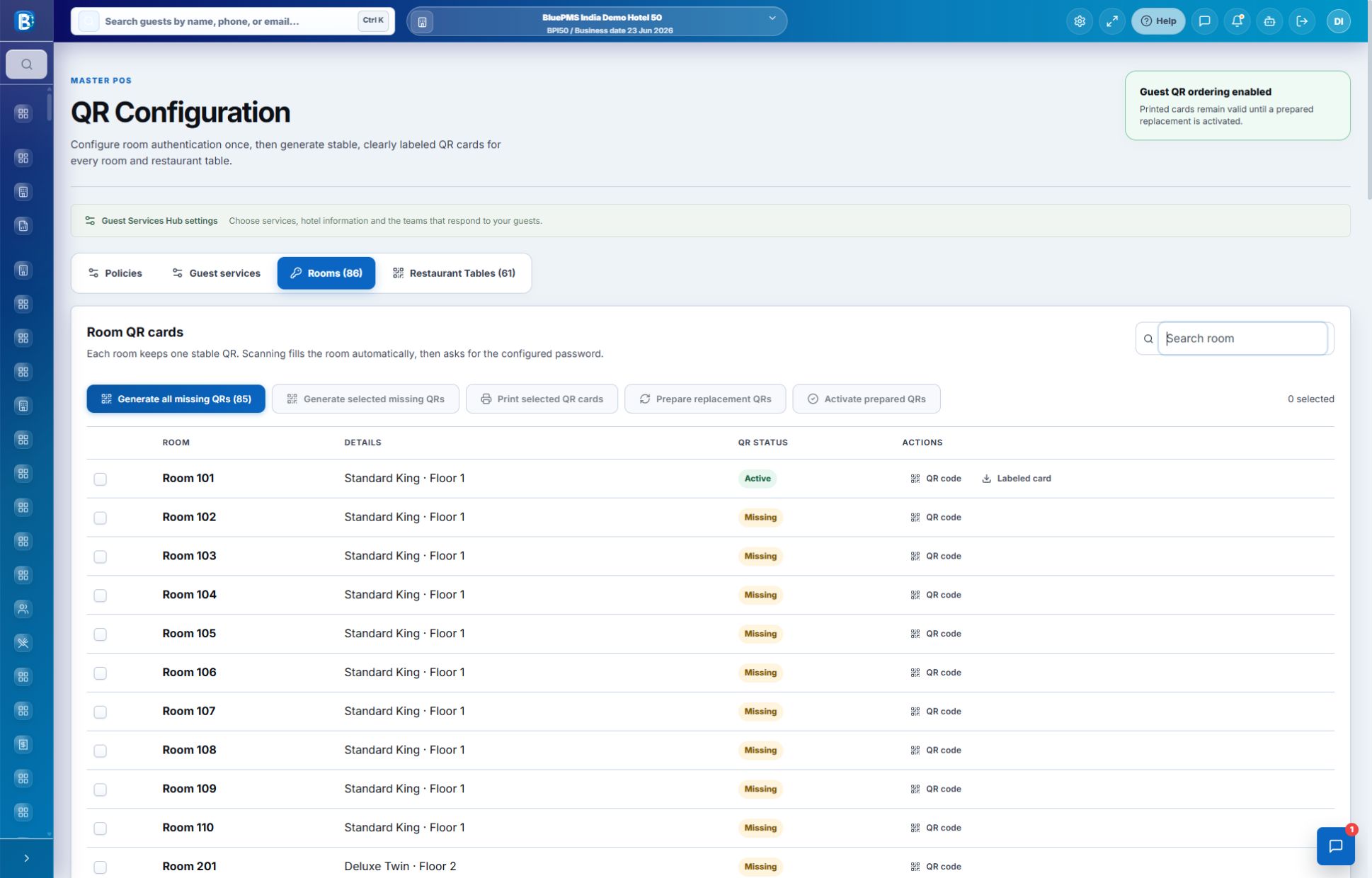
Find rooms and tables, generate missing codes and print selected cards. Add welcome text, instructions and a footer. Prepare replacements before activating them so existing cards stay valid until the switch.
All four images are unaltered product captures from the BluePMS demo property. Open any image to inspect the full-size screen.
Before you get started
Access, ordering, payments and setup explained in plain language.
No separate guest app is required. The QR code opens a BluePMS page in the guest’s web browser. Guests need an internet connection, and room access follows the hotel’s configured verification rules.
Yes. BluePMS manages room and restaurant-table QR codes. A room code can open the enabled Guest Services Hub and the restaurants available for room ordering. A restaurant-table code opens the dining experience for its assigned outlet and table.
Yes. The hotel can require staff acceptance before kitchen release. With that setting enabled, the team reviews the order and can accept or reject it. A Kitchen Order Ticket is created after acceptance.
Room-password access and personal access are separate. Requests, bookings, private activity and account information require a personal access code issued for an active registered guest. General Manager conversations have separate staff permissions.
Dining orders offer Pay at Outlet or eligible Charge to Room options; sending an order does not settle it. Separate online payment flows can support eligible Front Office bills, reservation advances, banquet deposits and club facilities when Stripe is configured and enabled. Payment does not automatically check the guest out.
No. The hotel selects which services appear. Booking services also need their own offers, prices, availability and operating rules. Turning on a service card is one part of setup; it does not make an unconfigured service bookable.
Room QR cards are designed to remain in place while guest access follows the current stay and configured password rules. BluePMS also lets staff prepare replacement codes and activate them when ready. An existing card remains valid until its prepared replacement is activated.
No. A guest-service QR opens hotel services or dining. A statutory invoice QR carries acknowledged tax-document information on supported bills. BluePMS handles these as separate workflows, with tax output depending on the country, provider and document configuration.
See it in BluePMS
Review room and table QR codes, the services you want to offer and the staff controls behind them in a focused product demonstration.